Showing posts with label hacking. Show all posts

Tuesday, January 11, 2011

How to reset BIOS password from Windows

Sometimes a few users to lock the BIOS to secure from unwantedactions such as locking the USB because there is essentially BIOS stands for Basic Input Output System, a computer system IBM PC (computer based on Intel's x86 family ofprocessors) refers to a collection of software routines who can dothe following things:

1. Initialization (ignition) and the testing of the hardware (in aprocess called the Power On Self Test, POST)
2. Load and run the operating system
3. Set some basic configuration of the computer (date, time,storage configuration, the configuration of the boot process,performance, and stability of your computer)
4. Helps operating systems and applications in the process of hardware settings using the BIOS Runtime Services.

BIOS provides a low-level communication interface, and can control many types of hardware (like keyboards). Because of its proximity to the hardware, the BIOS is generally made by using assembly language (assembly) used by the machine in question.
If you already know what your minds when you suddenly forget yourBIOS password inevitably you have to reset the BIOS password isthere some way to do that but I will tell fairly easyway for how to reset BIOS password from Windows.

With CMOS De-Animator is a utility that allows you to cancel theCMOS checksum of your system memory, reset all settings todefault and clearing any saved BIOS password (if any) at the time of re-boot. The main advantage of this utility is, that it can work under every Windows operating system, and no administrator rights needed! This utility does not have a GUI - just a confirmation message to start or come out, this utility is very portable, noinstallation required.
CMOS De-Animator

CMOS De-Animator

Simply run you'll see information as above and click OK to restartand start resetting your BIOS without you need the passwordagain.

NOTE: Some antivirus tools will be detected as a threat (trojan,malware, pipettes, downloader) because the tool is able to bypass the BIOS password protected.
Download the CMOS-DE-Animator this to reset the BIOS password from Windows

http://www.st-ware.com/page.php?23


Wednesday, December 29, 2010

Conducting Remote Desktop Connection With TeamViewer


Remote Desktop Connection Dengan TeamViewer

We can control a computer remotely, using certain software and Internet networks. The problem is, most software requires a lot of settings that are technical and too complicated. However, the software is now available that can help you control your computer remotely with very easily.

TeamViewer is a software that allows us to do desktop sharing over the Internet. We can control our partner computer located elsewhere, and do things. All this is very easy to do, and even we do not need to bother with things that are technical, such as firewalls, IP addresses, or NAT.

Indeed we can find many similar software, but TeamViewer provides solutions for all types of needs. TeamViewer is very simple and easy to use. We do not even need to install it first. We just need to run this software on our computers, and of course on the computer that we want to control from afar.

We can do many things with the help of TeamViewer. For example, we can show our desktop to our partners, and share product demos, presentations, and so forth. We also can use TeamViewer to control a server.

We can download and use TeamViewer free of charge, provided for non-commercial purposes. On his official website www.TeamViewer.com available several versions of TeamViewer, which TeamViewer full version, as well as several other versions for more specific purposes, such as to provide customer service, to control the server, and so forth.


Free Download Webroot Spy Sweeper 2011

Download Gratis Webroot Spy Sweeper 2011

Webroot Spy Sweeper 2011 is the software that will help protect your computer from spyware attacks. The software has features that are strong enough to detect and eliminate various problems of the spyware.


Broadly speaking Webroot Spy Sweeper 2011 has the following features:

Advanced Anti-Spyware Detection and Removal
Real-Time Anti-Spyware Solution
Enhanced Rootkit Discovery Methods
Always the most current anti-spyware solution
Easy to Use
Minimal Impact on Computer Performance
Accurate Risk Assessment
Uninterrupted Games and Movies
Webroot Software Spy Sweeper 2011 sold for $ 29.95, but within the framework of promotion you can get Webroot Spy Sweeper 2011 for free for life of 6 months. Way, please visit the facebook page here.


Monday, May 24, 2010

Connecting Your Freedom with Proxifier

Proxifier is a program that allows
network applications that do not
support working through proxy
servers operate through a HTTP or
SOCKS proxy server or a chain of
proxy servers. With Proxifier you
can easily tunnel all connections on
the system or separate applications.
There are many network
applications that do not support
working through proxy servers and
thus cannot be used behind a LAN
or firewall(s). These can
compromise corporate privacy and
lead you to many other restrictions.
Proxifier solves all of these problems
and gives you the opportunity to
work with your favorite software
without any restrictions.
Additionally, it lets you gain extra
control over network security,
create a proxy tunnel and add more
power to network functionality.
Proxifier allows you to:
Run any network applications
through proxy server; no special
configuration is required for the
software.
Access the Internet from
restricted local area network
through a proxy server gateway.
Bypass firewall restrictions
(connect to restricted ports).
Use three types of proxy servers:
SOCKS v4, SOCKS v5, and
HTTP.
“Tunnel” the entire system (force
all network connections in the
system work through a proxy
server).
Resolve DNS names through a
proxy server.
Use flexible Proxification Rules.
Secure privacy by hiding your IP
address.
Work through a chain of proxy
servers using different protocols.
Use NTLM authentication on
HTTP proxy
View information on current
connections (addresses, rate,
data transfer, connection time,
etc.) in real-time.
View information on bandwidth
usage as a colored diagram in
real-time.
Maintain log files.
Log incoming and outgoing
traffic.
Get detailed reports on network
errors.
… and much more.
..
www.proxifier.com
Set up
Install everything, then fact is MORE
secutity LESS speed, so open YF and
we going to set security at
minimum level
Check all OPTIONS except
Reconnect after server shutdown
Redirect SOCKS4/5 DNS to
Freedom server
And click SAVE and Exit
You YF is ready to go click Start
Connection
Run Proxifier click in Options, Proxy
Settings … Add with the following
Adress “localhost” Port “1080?
Protocol tick “SOCKS version 4?
Settings tick “Use SOCKS 4A
extension. (remote hostaname
resolving feature)
And OK
Click in Options, Proxification Rules…
leave ticked “Process All Except the
following + manually proxified”
Default, click OK to the warning
message
OK
Now we going to CHECK Proxifier
running on TOP of YF
Click in Options, Proxy Settings. we
leave in BLUE our proxy settings and
CHECK
All GREEN means OK and ready
Now you run you application, you
should feel better speed less lag, I
love to receive feedback on this and
tell me if you application / game
gets any better/worse
DOWNLOAD PROXIFIER 2.7
From : Your Freedom Forum


Tuesday, May 4, 2010

NEW TRICK OF AIRTEL PROXY 2010 FOR FREE BROWSE

Now I would like to share the secret how to browse and download for free with Airtel

For Mobile

First Change your gprs setting:
Proxy :65.110.6.45
port :80
use this APN : airtelgprs.com
Homepage : http://live.airtelworld.com
now open your homepage via mobile browser. it opens a proxy site where you insert any address to browse and download free.

FOR PC
connect your phone or modem to PC. dial your connection. when connection done go to your opera browser in pc .

Now go to-tools--preferences--advanced--network--proxy server: 65.110.6.45
port :80
open http://live.airtelworld.com via Opera browser
it openS a proxy site there input any address to browse and download.

for more trick just visit : www.freeinternettrick.co.cc


Tuesday, April 20, 2010

Creating a Simple LAN Computer Network

When YOU at home has more than one computer, and each computer wants to connect with each OTHER to get sharing data, printers, internet connection sharing etc, we can do to make your computer network LAN (Local Area Network) simple ..

this time we use a cable connection that is using a data cable UTP (unshielded twisted pair), which is standard LAN cable for network connection.
Computers are used at present are already equipped with LAN Card or also known as NIC (Network Interface Controller), or Ethernet Card.


If the number of computers that will be connected only two, we just simply providing a single UTP cable with a length according to the distance between the computer that at both ends of the cord that has been fitted with RJ-45 connector (standard connector for UTP LAN cable) and with the configuration Cross / cross.


If the number of computers that will connect more than 2 pieces, then we must add a device called the Switch or Hub. At the current price of a home-based switches to the standard is very affordable.
From each - each computer connected to the switch using UTP cable with RJ-45 connectors at both ends with a configuration Straight / straight.

Installation of connectors on UTP cable can be made yourself, but to simply just go to a computer shop that also provides network equipment, and living told to buy a pair UTP cable connectors with the configuration of all the cross / cross to connect the computer to the computer (two computers) , or straight / straight for more than 2 computer connections / use the switch.

Configuring the IP address (Internet Protocol / TCP IP)
To be able to communicate with each other, respectively - each computer must be given the IP address

• Go to Network Connections (Start -> Control Panel -> Network Connection)
• Select / double-click Local Area Connection
• Double click on Internet Protocol (TCP / IP)
• Click Use the Following IP address, then fill in the IP address and Subnet Mask
For example,
komputer1 IP Address: 192.168.0.1
komputer2 IP Address: 192.168.0.2
komputer3 IP Address: 192.168.0.3
komputer4 IP Address: 192.168.0.4
etc. ..
Must be the same Subnet Mask: 255.255.255.0


To determine success or failure of connection do the ping command from one computer to another computer
Example of komputer1 to komputer2:
• In Komputer1: Click Start -> Click Run -> type CMD -> click OK, then the Command Prompt window will appear
• Type in ping 192.168.0.2 hit enter
Reply from komputer2 there should be
• Perform the same command to find a connection to another computer.

DONE....

more trick at WWW.MYFREE-TRICK.CO.CC


HOW TO RECOVER ADMINISTRATOR PASSWORD AT YOUR PC

1.Insert Windows CD in your cd-rom and start your computer

2. Keep your eye on the screen messages for booting to your cd Typically, it will be “Press any key to boot from cd”

3.Once you get in, the first screen will indicate that Setup is inspecting your system and loading files.

4.When you get to the Welcome to Setup screen, press ENTER to Setup Windows now

5.The Licensing Agreement comes next - Press F8 to accept it.

6.The next screen is the Setup screen which gives you the option to do a Repair.It should read something like “If one of the following Windows XP installations is damaged, Setup can try to repair it”Use the up and down arrow keys to select your XP installation (if you only have one, it should already be selected) and press R to begin the Repair process.

7.Let the Repair run. Setup will now check your disks and then start copying files which can take several minutes.

8.Shortly after the Copying Files stage, you will be required to reboot. (this will happen automatically – you will see a progress bar stating “Your computer will reboot in 15 seconds”

9.During the reboot, do not make the mistake of “pressing any key” to boot from the CD again! Setup will resume automatically with the standard billboard screens and you will notice Installing Windows is highlighted.

10.Keep your eye on the lower left hand side of the screen and when you see the Installing Devices progress bar, press SHIFT + F10. This is the security hole! A command console will now open up giving you the potential for wide access to your system
At the prompt, type NUSRMGR.CPL and press Enter. Voila! You have just gained graphical access to your User Accounts in the Control Panel.

11.Now simply pick the account you need to change and remove or change your password as you prefer. If you want to log on without having to enter your new password, you can type control userpasswords2 at the the prompt and choose to log on without being asked for password. After you’ve made your changes close the windows, exit.

more trick at WWW.MYFREE-TRICK.CO.CC


Wednesday, April 7, 2010

Get Into the Zone Alarm (malware)

Malware. An odd sounding word created to lump all malicious software programs, including viruses, worms, trojans, spyware, adware, and other malevolent codes into one cause-your-computer-serious-hurt category.

In 2005, Computer Economics released a report on malware. The good news was that for the first time since 2002, the total worldwide financial losses from malware actually declined to a mere $14.2 billion. The bad news was that the nature of malware was changing from overt threats to more focused, covert attacks. This definitely is not great news for the average computer user just trying to keep up with the hundreds of malware programs that bombard us daily.

It’s not an easy task keeping malware out of your computer system. In order to accomplish this, you need a strong antivirus program. One such program that can deliver the goods is ZoneAlarm Internet Security Suite 6 from Zone Labs. Zone Labs is one of the most trusted brands in Internet Security for good reason. Their product, simply put, kicks serious malware gluteus maximus.

ZoneAlarm has received more review recommendations that any other Internet-security software suite because of its superb firewall and antivirus protection. It blocks pop-up ads, protects against identify theft and provides adequate spam filters that are flexible. It even beats the market leader, Norton Internet Security, which is often criticized for excessive system drag.

Its newest version includes these additional features:

• Triple Defense Firewall to prevent spyware from sending your information across the Internet. It also makes your computer invisible to anyone on the Net.
• Smart Defense Advisor which can automatically adjust your security settings for maximum protection against the latest virus and spyware outbreaks.
• Advanced Identify and Privacy Protection to prevent your personal data from leaving your computer without your approval.

The bonus for the average user who cringes at the idea of setting-up one of these systems is that the interface is easier to understand and use in comparison to most if its competitors. If you choose to venture beyond the out-of-the-box default settings, and install a more elaborate filtering, know that this will require some additional time to set up on your part.

Overall, ZoneAlarm Internet Security Suite is a user-friendly, comprehensive security solution that will have your computer safe from Internet hazards and cyber criminals within minutes of installation.


Monday, April 5, 2010

Internet Security Camera: Knowing What’s Happening inside Your Home While on Vacation

Being away from your home is always an unpleasant feeling especially when you’re on vacation, principally if you don’t know what’s happening inside your home. You will have thoughts of getting robbed, and getting your home invaded by strangers.

With this kind of thought, you will most probably have an unpleasant vacation. Having a vacation means that you should relax and take it easy. It is a fact that you can’t bring everything inside your home. So, the best way to protect all your things is by locking your home whenever you leave. However, because of the lock picking skills that some people may have, locking your home is not really enough.

Home alarm systems are very expensive. So, one good idea for securing your home and record every second on what’s happening inside your home is through an internet security camera. These are cameras that can be accessed through the internet. With this kind of technology, you can remotely access your home computer installed with the internet security camera and instantly get live images of your home.

The camera also has remote control features that you can use in order to get a full view on what’s going on in every part of your home.

The internet security camera can send live images directly over IP network and enables authorized users to remotely or locally access the camera. It will allow you to access the camera by typing in your user name and password.

Since the internet security camera can be controlled, you can make it tilt, pan, zoom and take a look at any part of the house as long as it is in the range of the camera.

Some cameras are wirelessly connected to your computer which allows it to be placed anywhere in you house as long as it is in its signal range.

With access to the camera, you can record the images being transmitted with your remote computer. You will be able to store and record the images. So, in case something happens in your house, such as someone breaking and entering, you can record it and show it to the police. Because of this ability, the police can catch the criminal easier.

Some cameras can even record sound and can be in color or in black and white image. Click and white images is cheaper and offers better quality.

So, if you want peace of mind when leaving your home, you can consider installing an internet security camera. With this kind of camera, you can access your home wherever you are in the world. The internet can be a powerful tool that you can use for security purposes.

With this kind of security, you can be sure that you will know everything that is happening inside you home. The thought of leaving your home will never be unpleasant again. With the internet security camera, you will bring your home with you wherever you go.

So, if you want to secure your home, purchase an internet security camera. You will also need a high speed internet connection in order for you to access your internet security camera, and a compatible operating system. With this kind of technology, you will get your home secured from robberies. Locks is a thing of the past, secure your home with an internet security camera.
FOR MORE INFORMATION, VISIT HERE: WWW.FREEINTERNETTRICK.CO.CC


Securing Your Computer System

Today, more and more people are using their computers for everything from communication to online banking and investing to shopping. As we do these things on a more regular basis, we open ourselves up to potential hackers, attackers and crackers. While some may be looking to phish your personal information and identity for resale, others simply just want to use your computer as a platform from which to attack other unknowing targets. Below are a few easy, cost-effective steps you can take to make your computer more secure.

1. Always make backups of important information and store in a safe place separate from your computer.

2. Update and patch your operating system, web browser and software frequently. If you have a Windows operating system, start by going to www.windowsupdate.microsoft.com and running the update wizard. This program will help you find the latest patches for your Windows computer. Also go to www.officeupdate.microsoft.com to locate possible patches for your Office programs.

3. Install a firewall. Without a good firewall, viruses, worms, Trojans, malware and adware can all easily access your computer from the Internet. Consideration should be given to the benefits and differences between hardware and software based firewall programs.
4. Review your browser and email settings for optimum security. Why should you do this? Active-X and JavaScript are often used by hackers to plant malicious programs into your computers. While cookies are relatively harmless in terms of security concerns, they do still track your movements on the Internet to build a profile of you. At a minimum set your security setting for the “internet zone” to High, and your “trusted sites zone” to Medium Low.

5. Install antivirus software and set for automatic updates so that you receive the most current versions.

6. Do not open unknown email attachments. It is simply not enough that you may recognize the address from which it originates because many viruses can spread from a familiar address.

7. Do not run programs from unknown origins. Also, do not send these types of programs to friends and coworkers because they contain funny or amusing stories or jokes. They may contain a Trojans horse waiting to infect a computer.

8. Disable hidden filename extensions. By default, the Windows operating system is set to “hide file extensions for known file types”. Disable this option so that file extensions display in Windows. Some file extensions will, by default, continue to remain hidden, but you are more likely to see any unusual file extensions that do not belong.

9. Turn off your computer and disconnect from the network when not using the computer. A hacker can not attack your computer when you are disconnected from the network or the computer is off.

10. Consider making a boot disk on a floppy disk in case your computer is damaged or compromised by a malicious program. Obviously, you need to take this step before you experience a hostile breach of your system.
FOR MORE INFORMATION, VISIT HERE: WWW.FREEINTERNETTRICK.CO.CC


Friday, April 2, 2010

Use USB Pen Drives as a RAM in Windows Xp, Win 2000, Win 2003

Yes Yes..As you all know about USB Pen Drive use as a RAM in Windows Vista. But Here a Trick for Use USB Pen Drive as a RAM in Windows XP, Windows 2000, Windows 2003.

For Example: You are using Pentium III, slow processor

and want high speed without spend money. or wanna boost your PC with high performance

so its a better option that use a Pen Drive as a RAM and boost your PC.

There is such a useful tool called eBoostr. The eBoostr™ trial version has no time expiration and you can evaluate it for as long as you wish. However the product demo is fully functional only for 4 hours after each system boot.

if u wanna use more then 4 hours just restart your PC and again its working for next 4 hours.

Download eBoostr

System Requirements

* Windows XP, Windows 2000, Windows 2003 (both 32 and 64 bit systems supported)
* USB 2.0 port version or memory card reader
* Flash drive or memory card with at least 2.5 MB/sec random read speed

Please Comments here if u like the post or any questions
FOR MORE , VISIT HERE: WWW.FREEINTERNETTRICK.CO.CC


Friday, March 19, 2010

File-Sharing Software Potential Threat to Health Privacy

The personal health and financial information stored in thousands of North American home computers may be vulnerable to theft through file-sharing software, according to a research study published online in the Journal of the American Medical Informatics Association.

Healthcare professionals who take patient information home to personal computers containing peer-to-peer file-sharing software are jeopardizing patient confidentiality, note the authors of the study.

"Computer users may be unaware that sensitive information in their personal files on their personal computers can be exposed to other users, because some vendors use software containing dangerous sharing features," says Prof. Khaled El Emam, Canada Research Chair in Electronic Health Information and lead author of the study.

El Emam's CHEO team used popular file sharing software to gain access to documents they downloaded from a representative sample of IP addresses. They were able to access the personal and identifying health and financial information of individuals in Canada and the United States. The research for the study was approved by the CHEO ethics board.

The study is the first of its kind to empirically estimate the extent to which personal health information is disclosed through file-sharing applications.

North Americans use file-sharing software such as Limewire, BitTorrent and Kazaa primarily to share and access music, videos, and pornography.

During their research on this project, El Emam said he and his colleagues found evidence of outsiders actively searching for files that contain private health and financial data. "There is no obvious innocent reason why anyone would be looking for this kind of information," stated El Emam. "Very simple search terms were quite effective in returning sensitive documents."

Most Canadians would be better off not using file-sharing tools if they want to protect their sensitive information. "Trying to use the programs' own privacy safeguards requires considerable information technology expertise," add Dr. El Emam.

Only a small proportion of the IP addresses the researchers examined contained personal health information, but since tens of millions of people use peer-to-peer file sharing applications in North America, that percentage translates into tens of thousands of computers.

The security of financial information has gained more public attention, and researchers did find that a higher percentage of downloaded files contained personal financial information. But as the United States and Canada move towards more digitization of health records, ensuring the privacy of health information is becoming a hot button issue.

A sample of the private health information the CHEO team was able to find by entering simple search terms in file-sharing software:

* an authorization for medical care document that listed an individual's Ontario Health Insurance card number, birth date, phone number and details of other insurance plans;
* a teenage girl's medical authorization that included family name, phone numbers, date of birth, social security number and medical history, including current medications;
* several documents created by individuals listing all their bank details, including account and PIN numbers, passwords and credit card numbers.

The study, financed by the Canada Research Chairs program, includes recommendations for managing risks when using file-sharing software.
FOR MORE , VISIT HERE: WWW.FREEINTERNETTRICK.CO.CC


Friday, March 12, 2010

OpenDNS Launches Free Porn Filter

OpenDNS, a innovative startup that uses the domain name lookup architecture to fix misspellings and block attempts to surf phishing sites, now lets home users and IT administrators alike to block access to adult-oriented sites, using a long list of verboten URLs provided by St. Bernard’s human-edited database iGuard.

OpenDNS, which THREAT LEVEL highly recommends, is a free replacement to domain name service usually provided by ISPs. DNS is essentially a constantly changing phone book for the internet. When you want to surf to wired.com, your computer asks a DNS server to translate the name of the site into the numeric IP address where the site currently lives. OpenDNS is attempting to add intelligence to this service by removing confirmed phishing sites from the database, letting users choose to have craigslist.cm automatically changed to craigslist.com to prevent domain squatting, and providing a keyword browsing service that works on multiple computers.

Now users can also choose to block adult content, from tasteless sites to hardcore pornography, by signing onto a new service. It’s easiest to use for large networks or individuals with a static IP address. Those who have a dynamic IP address (most common with dial-up or lower tier broadband connections) need to jump through an extra hoop by installing a program that reports your computer’s current address to OpenDNS. It’s relatively straightforward, though OpenDNS could do a better job of providing instructions.

Even if you aren’t interested in a free internet filter, you may well find that OpenDNS can keep you online when everyone else is timing out.

FOR MORE , VISIT HERE: WWW.FREEINTERNETTRICK.CO.CC


Monday, March 8, 2010

FreeCall: Make free local and mobile calls trick

Free calls are just a minute away

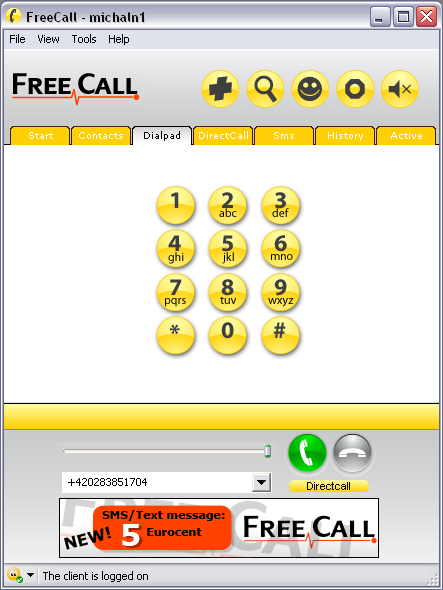
During this time of financial crisis you must have wondered if there was a way to make free calls so that you can reduce your cost of living a bit.Well we at cshared.com brings you with a new and cost free way of making calls to both local and mobile phones all over the world.Yep you heard it right and its totally FREE.

This program is called FreeCall.

Vist FreeCall to see whether your country is listed (almost all countries are listed there :) )

The best part is yet to come.We at cshared are going to exclusively announce the trick that you can implement to make the program give you more free calls.

freecall

THE TRICK:FreeCall is still a Freeware app but you only get 300 minutes a week. To bypass this restriction: Keep the setup.exe. Freecall’s protection system is quite flawed, when the program announces you cannot use any more minutes = Uninstall and reinstall and it will reset your 300 minutes which only takes a moment. A)You MUST make an account with the program when it loads up. Then when your logged in (it will say at the bottom: ‘The client is logged on’ Go to the dial pad TAB, ignore the on screen buttons, at the bottom type in your number and remember you need to add country codes at the beginning – NO spaces in the number either. C) And it does do all countries for free – i’ve used it from NZ to england, USA, Spain and Aussie and they used it back. D) If it didn’t work, you need to check your firewall settings etc, this is an obvious but a program like this needs full access.

Download link:

FOR MORE , VISIT HERE: WWW.FREEINTERNETTRICK.CO.CC


10 Google Chrome Extensions to double your productivity

If you’re a webmaster / blogger, its very likely that you’re FireFox lover like millions out there, but its also a fact that there are people romancing with Google Chrome amidst all this. I’ve been trying Chrome for sometime now and honestly its impressive. But something was not quite right with Chrome, or may be everything was too perfect. And recently Google added the extensions feature which opened up a whole new world of opportunities. With all these great extensions Chrome is as good as FireFox or even better sometimes. Check these extensions out and you’ll love it.

google-chrome-extensions

1. Access all you Google Tools with one single button

one-number-chrome-extension

If you’re the “awesome” type of blogger, then you’d have all the Google apps in your browser. Gmail, Reader and all that. And if your browser is crowded with extension buttons, this is the extension that will save you a lot of clicks, time and clutter. One button for all.

Download

2. Shorten URLs with one click while you’re browsing

16001

With all the social networking frenzy, you never run out of short URLs. You deal with them daily. And this extension makes it easy for you to shorten any URL you’re browsing right from the browser with a click, and that too the goo.gl format.

Download

3. Arrange your tabs vertically – save space and clicks !

6001

If you’re anything like me, there would be at least a 25 tabs open in the browser anytime of the day. This chrome extension arranges all the tabs that are open in your browser vertically. Ah ! Thank god we have this now.

Download

4. Get alerted when a new item is posted in your RSS subscriptions

121

If you’ve lot of RSS feeds subscribed to in Google reader and keeps a Google Reader tab open all the time, this extension will save that one tab and the frequent visits there to check for new updates. It shows a button that sits right in your browser window that pops up when a new item is posted to your RSS feeds.

Download

5. Store snippets of information for daily use anywhere on the web

333

This extension lets you store customized snippets of text/information like username / password or just about anything that you can use repeatedly anywhere on the web. Saves a lot of time typing.

Download

6. Get a bunch of SEO stats for any webpage, anytime in one click

seo-stats

If you’re the blogging/webmaster type, because of your curious nature you’d digg for SEO stats of those interesting websites you come across. This extension helps you get the basic SEO stats of any webpage in one button click. Stats include IP address, Host country, Alexa rank, Google Page Rank etc.

Download

7. Save visits to Wikipedia and Dictionary, get word meanings on mouse hover

4001

While searching for information you come across a lot of words which you wish you knew meaning of. And you often visit Wikipedia or Dictionary.com not to mention the hours you spent searching for stuff there. Now save on all that by getting to know the meaning of words right above them while you hover the mouse over.

Download

8. Get advanced SEO stats of any webpage in one click

seo-stats-chrome-extension

You’ll love this extension if you’re an SEO. This chrome extension gives you access to a full bunch of detailed SEO statistics like number of pages indexed on various search engines, Backlinks on other search engines, Traffic and ranks etc. To get this data otherwise, you’ll have to spent a lot of time and energy researching and collecting data.

Download

9. Run Internet Explorer inside Google Chrome

ie-in-chrome

Feeling nostalgic or trying a cross browser compatibility test ? No need to open that ugly thing again ? Using this chrome extension you can open any webpage in IE right inside Chrome.

FOR MORE , VISIT HERE: WWW.FREEINTERNETTRICK.CO.CC


Saturday, March 6, 2010

How to Log on to Windows XP if You Forget Your Password

Here is a simple way to access Windows XP with Administrator rights and privileges if you have password protected your User account on your Windows XP system and can't remember the password(s) to login. Whenever Windows XP is installed on a system, it creates a default account called "Administrator" and by default this account is not password protected. Therefore, if you bought a brand name computer (such as Dell, HP, Compaq or Sony)or you have installed Windows XP yourself. You should be able to login to the computer through the unprotected Administrator account.


1.Reboot your machine.

2. Press F8 before the Windows boot screen appears. Do not press F5 as used on the NT/9x series of Windows. You will be be prompted with a boot options menu.

3.Select the Start Windows in Safe Mode option.

4. Click through several self-explanatory screens until your reach the familiar 'Welcome' screen.
Note that this welcome screen is limited to 256 colors and 640x480 resolution because the primary graphics will have been set to the Windows Safe Mode software VGA adapter. You will not be able to change this mode even in Display options, while Windows is running in Safe Mode.

5.Find the icon for the Administrator user. If the default settings of your system haven't been changed, there should be no password for this account.

6.The Safe Mode Welcome screen might display some of the other users on your system.

7.Login as the admin.

8.Press Yes at the prompt asking if you would like to continue using Safe Mode.

9.Continue on to the User Settings control panel. Here you can change any of the other
passwords for user on the machine. Make any changes you want.

10.Reboot your computer. As long as you don't press any keys (i.e. F8) during the boot-up the computer will startup normally.

11.Login as the user for which you set the password.

12.If it doesn't work above, you can try to use professional support recommendation OPHCrack (freeware) to crack your windows password without erasing anything.


Setting new password
1.Open the Control Panel.

2.Click the User Account.

3.Select the account you want to to set a new password.

4.Click changing Account and set up password, then fill out the form as listed. Click Create Password.

5.You now have a personal login ID and Password. No one has a right to login to your
FOR MORE , VISIT HERE: WWW.FREEINTERNETTRICK.CO.CC


Twitter Delicious Facebook Digg Favorites More